Optical security technology is a critical safeguard for identity documents used worldwide. However, different issuance scenarios—such as on-site issuance, decentralized enrollment, and centralized mass production—place very different demands on security overlays.

Choosing the right optical security overlay and applying it correctly is essential to achieving the intended security level.
Based on international ID document applications, this guide summarizes common issues and proven solutions for four widely used ID card security overlays in government and institutional ID systems.
1. ID Card Heat Transfer Overlay
ID card heat transfer overlays form an integrated security layer by bonding the optical film directly to the card surface and removing the PET carrier. Most performance issues are related to insufficient surface preparation.
Common Issues
- Weak bonding or localized peeling
Root Cause
- Dust, oil, or residue on the card surface prevents full adhesion during heat transfer.
Solution
- Add a pre-cleaning step before lamination.
- Use adhesive dust rollers or alcohol wipes (ensure the surface is completely dry before processing).
- Clean the lamination platform and rollers regularly to avoid secondary contamination.
2. Optical Patch Overlay for ID Cards
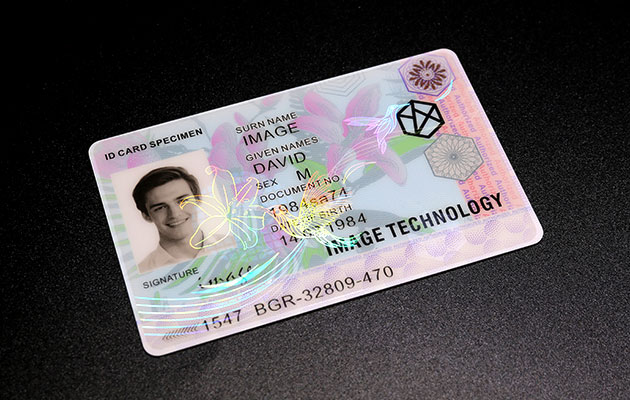
Optical patch overlays require dedicated lamination equipment and controlled storage conditions. Most issues result from equipment mismatch or improper film storage.
Common Issues
Film Peeling or Reduced Durability
Root Cause
- Incorrect patch type for the card material or wrong feeding orientation.
Solution
- Provide the supplier with detailed equipment specifications (feeding direction, pressure range).
- Confirm card material type (PVC, PETG, or PC).
- Always perform trial runs and scratch resistance tests before mass production.
Performance Degradation During Storage
Root Cause
- Excessive temperature or humidity affects adhesive stability and optical performance.
Solution
- Store films at 20–30°C with 45–60% relative humidity.
- Reseal packaging after opening.
- Use desiccants when required to control moisture.
3. Embedded Laminate Overlay for Card Factory Use
Embedded laminate overlays are mainly used in centralized card manufacturing, where optical security elements are embedded inside the card body. Issues typically relate to layout accuracy and lamination parameters.
Common Issues
Security Image Misalignment After Punching
Root Cause
- Incorrect multi-card layout or inaccurate positioning during design.
Solution
- Use professional card layout software with positioning and registration marks.
- Conduct trial laminations and punching tests before full-scale production.
Reduced Bonding Strength in Security Zones
Root Cause
- Heavy ink coverage or incorrect lamination settings interfere with material bonding.
Solution
- Avoid placing security features under large solid ink areas.
- Adjust lamination parameters based on card material:
- PC cards: 180°C ±2°C
- PVC cards: 105°C ±2°C
- Lamination time: approximately 23 minutes
- Keep security elements localized to reduce structural stress.
4. Hand-Applied Cold Laminate Overlay
Hand-applied cold laminate overlays are widely used for temporary issuance, remote locations, or environments with limited power supply. While manual application offers flexibility, it is more sensitive to operator technique and environmental cleanliness.
Common Issues
Misalignment During Application
Root Cause
- Manual positioning errors during initial placement.
Solution
- Lightly mark alignment boundaries on the card surface.
- Align one edge first, then apply pressure gradually across the card.
- Minor misalignment can be corrected before full adhesion sets.
Poor Adhesion, Bubbles, or Surface Defects
Root Cause
- Dust, oil, or airborne particles on the card surface.
Solution
- Clean the card with a lint-free cloth and neutral cleaner.
- In dusty environments, apply the overlay inside a simple enclosed space (such as a clean box).
- After application, use a rigid plastic card to press out trapped air and enhance adhesion.
Conclusion
Selecting the correct ID card security overlay is only the first step toward effective document protection. Stable performance also depends on proper handling, equipment compatibility, environmental control, and process management.
This article focused on common issues and solutions for card-based ID security overlays. However, many secure credentials—such as passports, visas, and certificates—use paper or booklet formats. These applications involve different materials and process requirements, which will be discussed in the next part of this series.